


Atomic Wallet is a popular crypto wallet used by many beginners and normal users. Coinbase is also a famous crypto exchange trusted by many people. Many users want to move crypto from Atomic Wallet to Coinbase. This is usually done to sell crypto, keep it safer, or trade coins. But beginners feel scared because one small mistake can lose money. This fear is normal. Crypto transfer look hard at first time. But when steps are followed slowly, it become easy.
Atomic Wallet has Send option and Coinbase has Receive option. These two options work together. The most important thing is correct address and correct network. If network is wrong, crypto can be lost forever. That is why learning before sending is very important.
Key Points:
- Coinbase receive address is needed first
- Atomic Wallet send option is used
- Network selection is very important
What Is Needed Before Sending Crypto To Coinbase
Before sending crypto, some things must be ready. First, a Coinbase account is required. Coinbase account must be verified. Verification help protect money. Second, Atomic Wallet must have crypto balance. Third, correct coin must be selected on both apps.
For example, Bitcoin must be sent to Bitcoin address only. Ethereum must go to Ethereum address. Fourth, internet connection must be stable. Weak internet can cause confusion. Coinbase show Receive button for each coin. This button give deposit address. This address is long and look confusing. But copying it correctly is important.
Atomic Wallet also show Send button. These two buttons are main part of process. Beginners should not rush. Going slow reduce mistake. This preparation stage help avoid panic later. When everything is ready, sending become smooth and easy.
How To Get Coinbase Deposit Address Safely
Coinbase deposit address is used to receive crypto. To get this address, Coinbase app or website must be opened. After login, Receive option is clicked. Then correct coin is selected. Coinbase then shows address and QR code. This address is unique for each coin.
Copy button is used to copy address. Copying is better than typing. Typing can cause spelling mistake. Address must be saved temporarily for sending. Beginners sometimes copy wrong coin address. This is dangerous. Always double check coin name shown on screen. Coinbase also show network information. This helps match network with Atomic Wallet.
Taking time here save money. Never use address from message or email. Always generate address directly from Coinbase app. This protect from scam. Address generation is free and safe.
How To Send Crypto From Atomic Wallet Step By Step
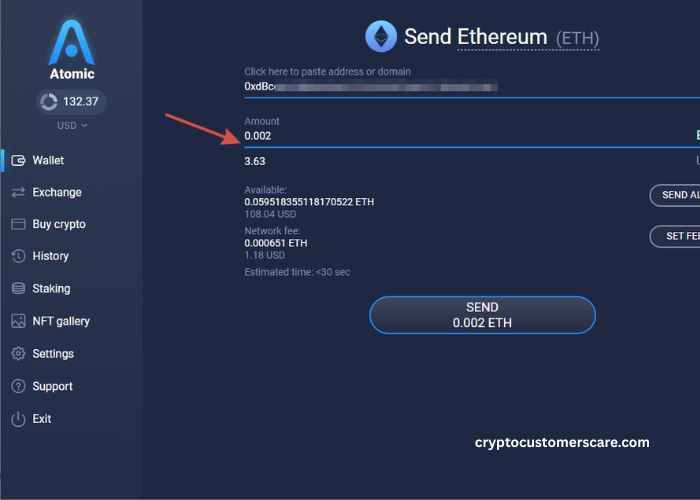
After getting address, Atomic Wallet must be opened. Wallet tab show list of coins. Correct coin is selected. Then Send button is clicked. A form open. In address box, copied Coinbase address is pasted. Amount is entered. Atomic Wallet show network fee. Fees depend on blockchain. After checking details, send is confirmed. Transaction start processing.
Blockchain takes some time to confirm. Waiting is important. Do not resend same transaction. That can cause double sending. Transaction status can be checked using transaction ID. Atomic Wallet shows this ID. Coinbase shows pending deposit until confirmation complete. This waiting time is normal. Some coins are fast, some slow. Patience is key here.
| Step | Action |
| 1 | Copy Coinbase receive address |
| 2 | Open Atomic Wallet send option |
| 3 | Paste address and confirm |
Choosing Correct Network To Avoid Loss
Network selection is very important. Many coins support multiple networks. For example, USDT can be sent on different networks. Coinbase only supports some networks. Atomic Wallet also shows network options. Both sides must match. If Coinbase says to use ERC20, then Atomic Wallet must send on ERC20. Sending on wrong network cause permanent loss.
Always read network name carefully. Do not guess. When unsure, check Coinbase help page. Using correct network keeps funds safe. This step should never be rushed. Network mismatch is biggest reason of lost crypto. Learning this protects money strongly.
| Network Type | Risk |
| Correct Network | Safe transfer |
| Wrong Network | Permanent loss |
What To Do After Sending Crypto
After sending, waiting is needed. Atomic Wallet show transaction as pending. Coinbase also shows pending deposit. This is normal. Blockchain confirmations are needed. Some coins need many confirmations. During this time, do not panic. Checking transaction ID on blockchain explorer helps see progress. Once confirmed, Coinbase balance update.
Then crypto can be traded or sold. This complete the transfer process. Keeping transaction record is good habit. Screenshot can be saved. This helps if support is needed. Usually no problem occur when steps are followed correctly.
Conclusion
Sending crypto from Atomic Wallet to Coinbase is easy when steps are followed. Correct address and network are most important. Beginners should always go slow. Using copy paste reduce error. Atomic Wallet and Coinbase both provide simple tools.
Learning this process gives confidence. With correct knowledge, crypto transfer become safe and stress free.
FAQ’s
- Is it safe to send crypto from Atomic Wallet to Coinbase?
Yes, it is safe when correct steps are followed. - Which option is used in Atomic Wallet?
The Send option is used for transfer. - Where to get Coinbase address?
The address is found under Receive option in Coinbase. - Can wrong network lose money?
Yes, wrong network can cause permanent loss. - How long does transfer take?
Time depends on coin and blockchain speed.